session recall

Local-first · Read-only · macOS

Find that session again.

Session Recall keeps one local full-text index of every coding-agent session on your Mac. Eight agents, one search box. Find the turn you half-remember, open it exactly, and hand it back to your agent.

v1.3.0 · macOS 11+ · 26.7 MB · MIT

  • No account
  • No telemetry
  • Never writes to agent storage
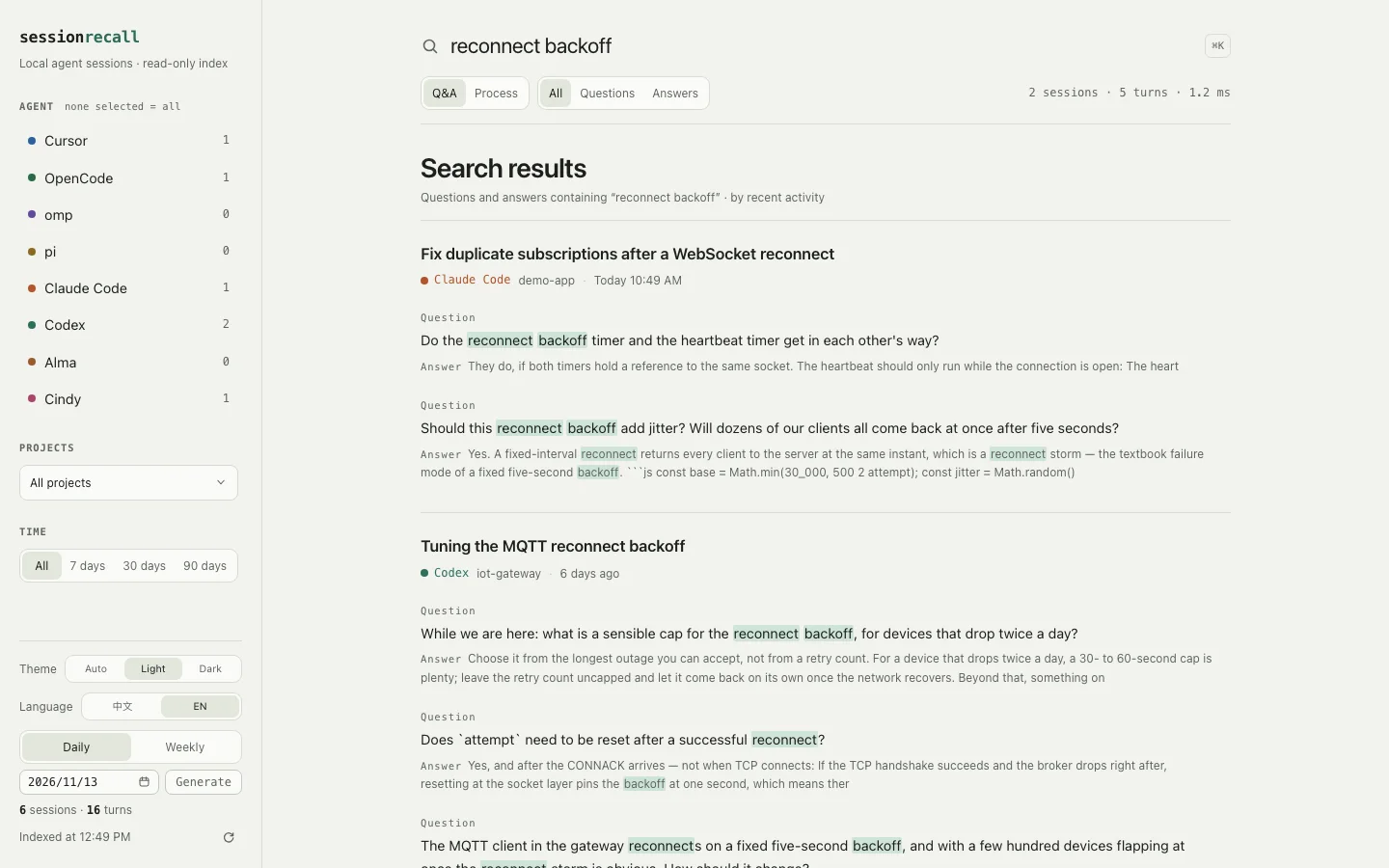
The Session Recall search results window. A search for “reconnect backoff” returns two sessions and five turns, with matched terms highlighted in green and the agent, project and date shown for each hit.

Actual app UI over a synthetic index of demo sessions. The query “reconnect backoff” returns 2 sessions and 5 turns in 1.2 ms; every matched term is highlighted. The sidebar carries the agents, the project filter and the date range.

Indexes sessions from

  • omp
  • pi
  • OpenCode
  • Cursor
  • Alma
  • Cindy
  • Claude Code
  • Codex

How it works

One index for eight agents.

Each session is stored as turns — the question you asked and the answer you got — plus, in a second scope, the process events around them. All of it lives in a single SQLite file you can move, back up or delete: ~/Library/Application Support/session-recall/index.db.

Search the words you remember.

Full text over prompts and answers, backed by SQLite FTS5 with a trigram tokenizer for Chinese phrases, substrings and code identifiers, falling back to porter for English. Wrap an exact phrase in quotes; multiple terms are AND-ed.

Search the run, not just the reply.

Switch to the process scope and search tool calls, shell commands, stdout and stderr, and the error lines extracted from them. Reasoning is excluded, so results stay about what actually happened.

Land on the exact turn.

Every result deep-links to sessionrecall://session/<id>?turn=N with your terms highlighted. The session page carries the exact resume command and a copyable Markdown handoff card.

Read-only by design.

The index is a separate SQLite file. Agent stores are opened read-only and never written to, and sessions never leave the Mac — there is no sync and no account.

Filters agent · project · date range · prompt/answer role

Screenshots

Built for a half-remembered query.

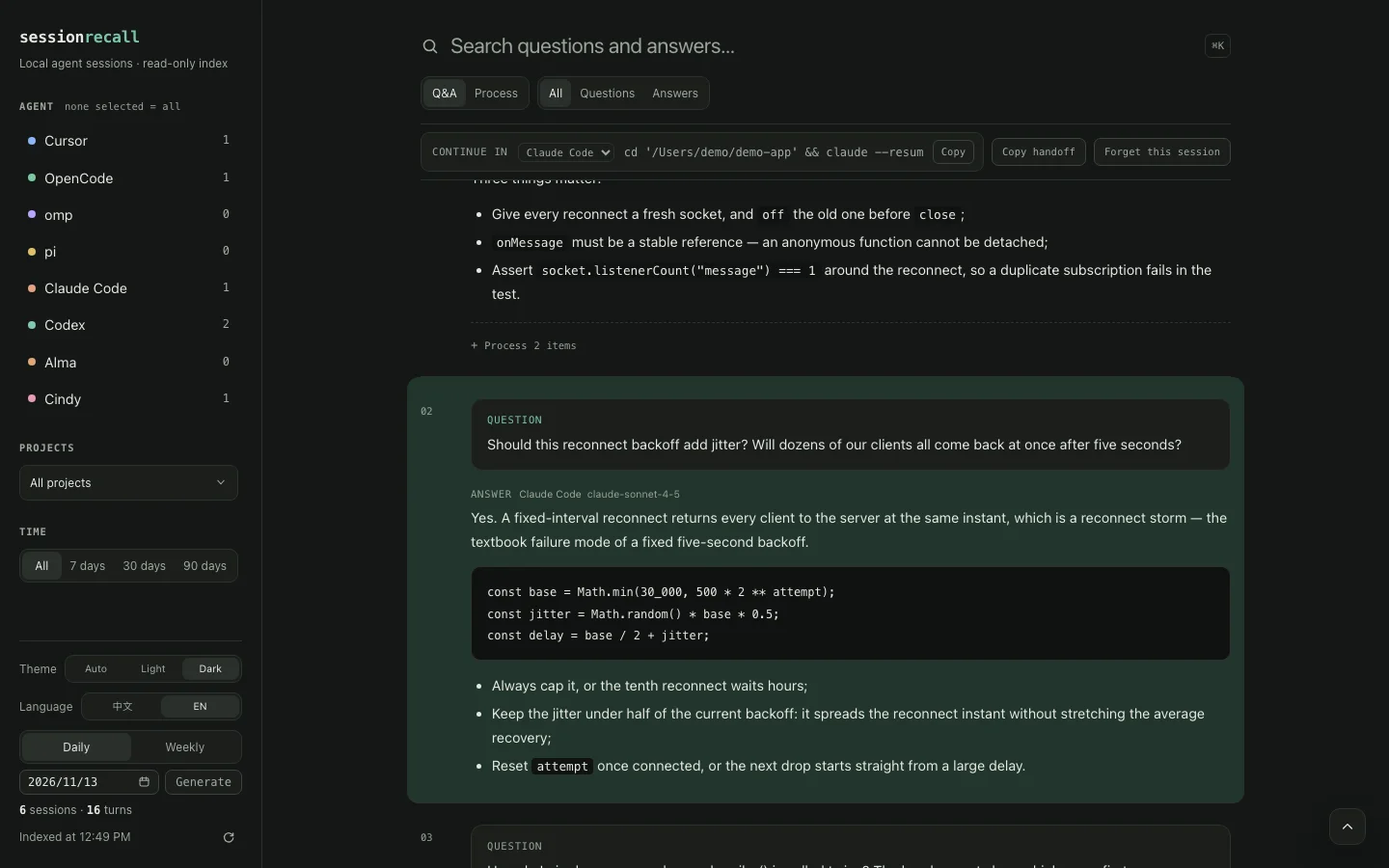
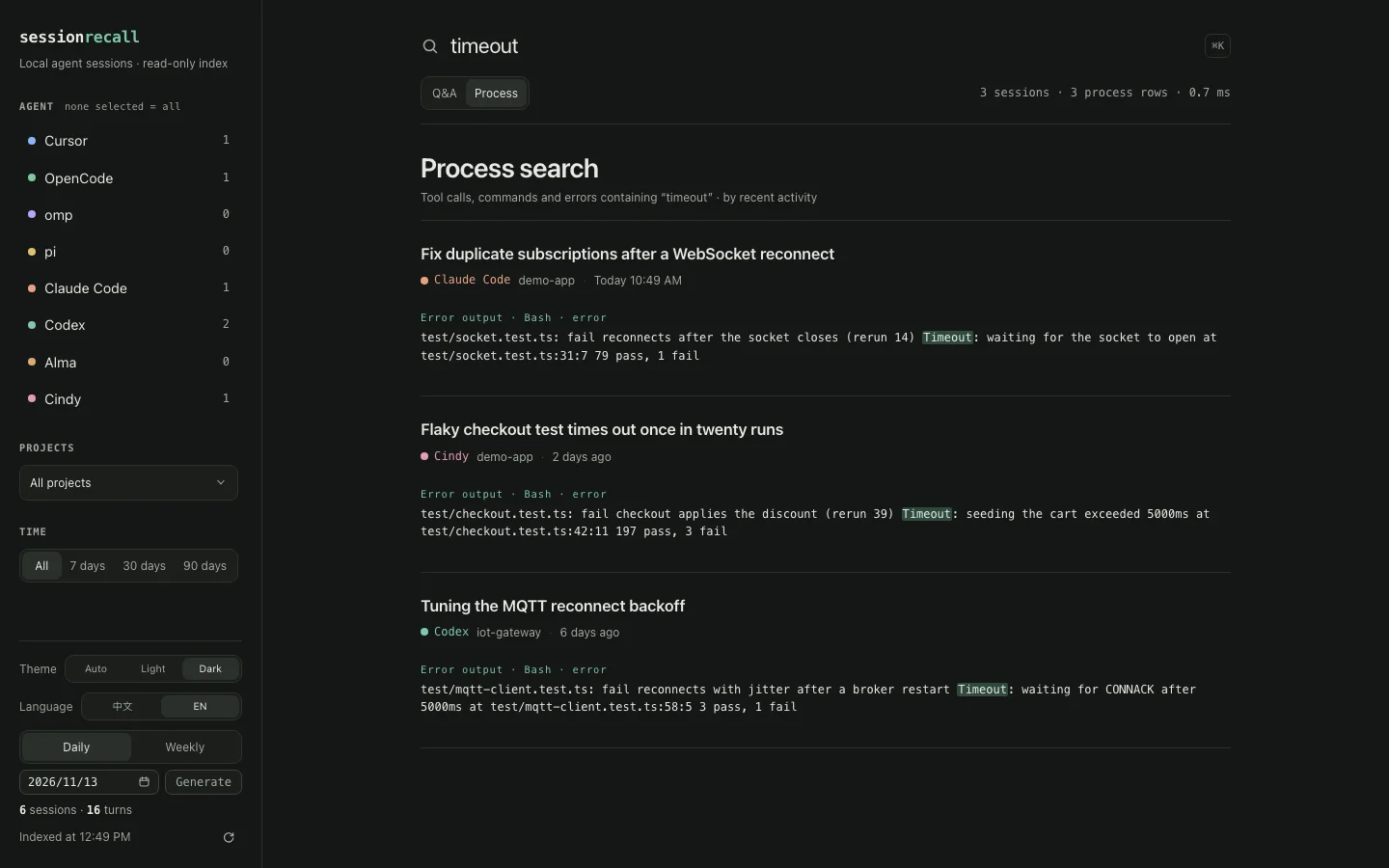
Two views of the same index: opening a session at the turn you found, and searching the process output around a failure. Both run over a synthetic index of demo sessions.

The Session Recall session detail view in dark theme, opened at turn 02 with the matched answer highlighted. A bar above the transcript reads CONTINUE IN Claude Code, followed by the resume command, a Copy button and a Copy handoff button.
Session detail. The bar above the transcript holds the Continue in command — here cd '/Users/demo/demo-app' && claude --resume — next to Copy and Copy handoff, so the next prompt starts from the session you found.
The Session Recall process search view in dark theme. A search for timeout returns three sessions and three process rows in 0.7 ms, each showing an extracted error line from a failing test with the matched word highlighted.
Process search. A search for timeout against tool calls, commands and error output — 3 sessions, 3 process rows, 0.7 ms. Each row names the agent, the project and the date.

Install

Two minutes to your first search.

  1. Download, unzip, drag to Applications.

    Take the Apple silicon build or the Intel build — both are the same app. The packaged app is about 67 MB and ships its own runtime, so nothing else needs installing first.

  2. Clear the quarantine flag.

    Session Recall is ad-hoc signed but not notarized, because notarization needs a paid Apple Developer account. macOS therefore stops the first launch and claims the app is damaged. Run this once per copy and it opens normally from then on:

    xattr -dr com.apple.quarantine \
      "/Applications/Session Recall.app"
    open -a "Session Recall"
    # from a clone, for the CLI and MCP server
    bun run scan
    bun run sr "websocket" --limit 3
    bun run mcp
  3. Open it and search.

    The app scans agent storage on boot and refreshes the index every 90 seconds while it is open. Type the words you remember — quote an exact phrase if you have one.

macOS 11 or later. The packaged app includes its own runtime; Bun 1.3+ is only needed for the CLI, the MCP server, or building from source.
Index: ~/Library/Application Support/session-recall/index.db

For agents

Your agent can search it too.

bun run mcp serves the same index to any MCP client over stdio — no port, no network. Point your client at the absolute path:

MCP server docs
{
  "mcpServers": {
    "session-recall": {
      "command": "bun",
      "args": ["run", "/absolute/path/to/session-recall/src/cli.ts", "mcp"]
    }
  }
}

Questions

What people ask before installing.

Does anything leave my Mac?
No. There is no account, no sync and no telemetry. Sessions are read from agent storage into a local SQLite index at ~/Library/Application Support/session-recall/index.db and are never uploaded anywhere.
Which agents does it index?
Eight: omp, pi, OpenCode, Cursor, Alma, Cindy, Claude Code and Codex. omp and the official pi share a JSONL format; the others are read from their own stores. Each adapter is read-only and each one excludes its agent's private records.
Does it modify my history?
No. Agent stores are opened read-only and never written to. The only file Session Recall writes is its own index, and deleting that index only costs you the time to rebuild it.
Why does macOS warn on first launch?
The app is ad-hoc signed rather than notarized, so Gatekeeper treats a fresh copy as untrusted and reports it as damaged. Clearing the quarantine attribute once per copy — xattr -dr com.apple.quarantine "/Applications/Session Recall.app" — tells macOS to trust it from then on.
Apple silicon or Intel?
The Apple silicon build is 26.7 MB and the Intel build is 29.5 MB; both are v1.3.0 and both need macOS 11 or later. If you are not sure which Mac you have, open the Apple menu and choose “About This Mac”.
What about Windows and Linux?
No. Session Recall is a macOS app and indexes agent storage in macOS locations. The CLI and the MCP server run under Bun, but no Windows or Linux build is published.
How current is the index?
The app scans on boot and refreshes every 90 seconds while it is open. The MCP server refreshes in the background when the index is more than five minutes old, and reports how stale it is with every reply.
How do I update?
Download the newer zip from Releases, replace the app in Applications, and clear the quarantine flag again for the new copy. Your index lives outside the app and is reused, so there is nothing to re-scan from scratch.